OpenTofu - S3 & DynamoDB for Remote State Storage & Locking 
Overview 
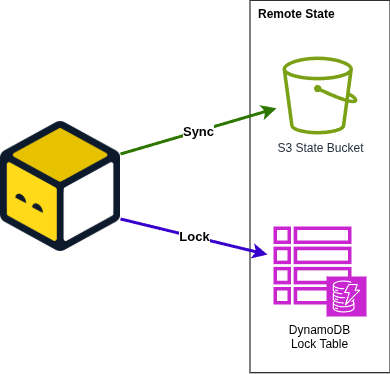
Use this tofu configuration to create the S3 bucket & DynamoDB table needed to use OpenTofu Remote State Storage & Locking.
What is the OpenTofu Remote State?
Read the official definition by Hashicorp.
Prerequisites 
OpenTofu repo structure + state backend initialization
- Ensure you have
Leverage CLIinstalled in your system - Refer to Configuration Pre-requisites to understand how to set up the configuration files required for this layer. Where you must build your OpenTofu Reference Architecture account structure
- Leveraged by the Infrastructure as Code (IaC) Library through the terraform-aws-tfstate-backend module
Set up 
Steps to initialize your tf-backend
- At the corresponding account dir, eg: /shared/base-tf-backend then,
- Run
leverage tofu init --skip-validation - Run
leverage tofu plan, review the output to understand the expected changes - Run
leverage tofu apply, review the output once more and typeyesif you are okay with that -
This should create a
terraform.tfstatefile in this directory but we don't want to push that to the repository so let's push the state to the backend we just created- Open
config.tfand uncomment the following lines:# backend "s3" { # key = "shared/tf-backend/terraform.tfstate" # } - Run
leverage tofu initand typeyeswhen OpenTofu asks if you want to import the state to the S3 backend - Done. You can remove
terraform.tfstatenow (and alsoterraform.tfstate.backupif available)
- Open
Expected workflow after set up 
 This video is outdated!

OpenTofu Remote State 
In the base-tf-backend folder you should find the definition of the infrastructure that needs to be deployed before
you can get to work with anything else.
IMPORTANT
This is only needed if the backend was not created yet. If the backend already exists just use it.